Posts

Complete list of 118 Apps Banned By Indian Govt including PUBG

Image
  India government today announced that they have banned 118 Chinese App including the popular app PUBG which had a huge base in India. Here is the complete list issued by Ministry of Electronics & IT APUS Launcher Pro- Theme, Live Wallpapers, Smart APUS Launcher -Theme, Call Show, Wallpaper, HideApps APUS Security -Antivirus, Phone security, Cleaner APUS Turbo Cleaner 2020- Junk Cleaner, Anti-Virus APUS Flashlight-Free & Bright Cut Cut – Cut Out & Photo Background Editor Baidu Baidu Express Edition FaceU - Inspire your Beauty ShareSave by Xiaomi: Latest gadgets, amazing deals CamCard - Business Card Reader CamCard Business CamCard for Salesforce CamOCR InNote VooV Meeting - Tencent Video Conferencing Super Clean - Master of Cleaner, Phone Booster WeChat reading Government WeChat Small Q brush Tencent Weiyun Pitu WeChat Work Cyber Hunter Cyber Hunter Lite Knives Out-No rules, just fight! Super Mecha Champions LifeAfter Dawn of Isles Ludo World-Ludo Superstar Chess Rush ...


India Finally Banned PUBG Along with 117 Chinese apps

Image
India government today announced that they have banned 118 Chinese App including the popular app PUBG which had a huge base in India. There were also complaints from parents all over India to ban the PUBG since the children were addicted to the app and there were also reports that children were died due to continuously playing addicted game PUBG. Parents will be very happy that the App has Banned, however, young adults will be sad and will be looking for alternatives. Indian companies now looking to grab the opportunity to grab users like how they did when Tik Tok was banned.  According to the Ministry of Electronics and Information Technology, the mobile game has been banned along with the other apps under Section 69A of the Information Technology Act, on grounds that "they are engaged in activities which are prejudicial to sovereignty and integrity of India, defence of India, the security of state and public order". "This decision is a targeted move to ensure safety, s...

How To Load Website Faster using WebP | Techcinefun

Image
Creating a Website (or) Blog is quick and easy, thanks to online tools like Blogger, WordPress etc. Then to make it shine (or) easy to eyes, we will add images and videos to make a post engaging and interesting to read and in process of doing it, the website starts loading slowly and will lose the user's due to low response time(loading time). On average a user waits less than 3sec for a page to load and we have to load the website and make it clickable(in case it is mobile) under 3sec. In today's post, I will share, How to load the website (or) blog in less than 3sec. Also Read:  How I Submitted My Blog to Google Search Since we already discussed one of the major factors is the loading of images, if we decrease this time, then our pages will load quick and fast. Google has come up with image format(common image formats .jpg, .png etc) called WebP which according to Google make the web faster, now comes the question what is webp and how do I make the image WebP? Then let'...

How I Submitted My Blog to Google and Bing Search | Techcinefun

Image
So you have decided to blog using Blogger by Google (or) WordPress (or) nowadays Vlog using Youtube (or) decided to make your website of a custom domain. Whatever the option you choose, you want to get noticed and generate the traffic for the content you are writing. In today's post, I will share, How I submitted my Blog to Google Search engine and other search engines such as Bing. Then let's jump into it. How to submit a blog to Google search engine Submitting a blog to Google is EASY . Just follow these steps to help make your blog visible in Google search: 1. First, add your blog to Google Search Console Google Search Console (GSC)  is a place where you can submit your newly created Blog. Inside Google Search Console, Click on ' Add Property ' and Add the Blog URL (or) your newly created Website URL.     ...

Indian Supreme Court Decision on Sushant Singh Rajput Case

Image
Mumbai:  The response of Riya Chakraborty's lawyer has come after the Supreme Court order in the  Bollywood Actor Sushant  Rajput Case. As per ANI  Riya's lawyer Satish Manashinde said, "Riya will now appear and face the CBI investigation in the same way as the Mumbai Police and Enforcement Directorate (ED) have investigated before."  Riya is firm on his stand that whatever investigation agency does, the truth will remain the same.  Riya Chakraborty's lawyer Satish Manashinde said that after examining all the facts, circumstances and Mumbai Police report related to the case. The apex court, in its judgment, has justified the recommendation of the Bihar government for the FIR and CBI investigation in Patna, directing the Mumbai Police to hand over all the evidence and documents collected so far to the CBI.  The court has said that 'Maharashtra government should follow the court ...

What is Google Meet and How to use it - Check this tutorial to find out?

Image
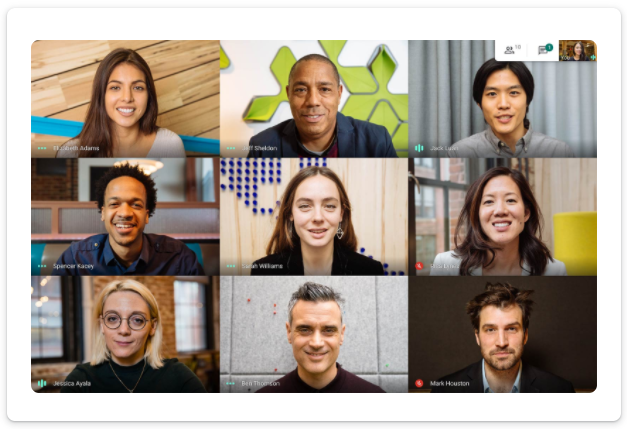
Intro Google Meet, the new Video Conferencing App from Technology giant Google has been introduced to all users who has Google Account. This means you can use features which was available only to G-suite members to all the members. Re-Branding Google already has Duo and Hangouts for Casual Video chats and has rebranded the Hangouts to Google Meet What Made Google to Jump? Google has jumped into Free Video Conferencing market after the surge in Video chat apps during COVID-19 pandemic and subsequent lockdown, which made Zoom capitalise market initially and shares of Zoom skyrocketed, seeing the surge, BIG companies like Google, Microsoft who was offering the services only for Professional use (or) Business meetings st...

How Love Happens in the Corona World - A Poetic Shayari About Corona

Image
We all know how Corona has badly impacted us emotionally, physically and mentally Below is the video of how love will happen during Corona

Google India Introduces the people card on Google Search for Mobile Devices with ' Add me to search'.

Image
Google India has rolled out a new feature called People Cards for Indian consumers for Mobile Platform only(Not for Desktop) — a Google Search feature that lets users create a virtual visiting card, highlight their existing website or social profiles. People Cards is aimed at helping the millions of individuals, influencers, entrepreneurs, prospective employees, self-employed people, freelancers, or anyone else out there who wants to be discovered and help the world find them. Starting today, users across India can discover the people cards on their mobile phones, in English. How to create a People Card on Google For Mobile Devices: To create a People Card, sign in to your Google Account on your Chrome Browser app for Mobile.  Search for your name, or “add me to Search” and tap the prompt that appears. You will be asked to provide your phone number for verification purposes. Enter the six-digit code to continue. To start building your people card, people can choose to include...

Instagram Reels - Answer to Popular App Tik Tok

Image
Image Credits: Instagram Instagram has launched the much awaited feature in its app for which Indian users were awaiting after the ban of Tik Tok and 59 apps in total by Govt of India. Tik Tok was more popular among the Indians and for Tik Tok it became minting money machine for them since it has highest numbers of users compared to other countries and it also topped charts in the Play store for most number of downloads. Now let's talk about its features. Similar to TikTok , users can record 15-second video clips set to mu...

All the Questions Answered About Rs.500 and Rs.1000 In this Frequently Asked Question Document

1. Why is this scheme? The incidence of fake Indian currency notes in higher denomination has increased. For ordinary persons, the fake notes look similar to genuine notes, even though no security feature has been copied. The fake notes are used for anti-national and illegal activities. High denomination notes have been misused by terrorists and for hoarding black money. India remains a cash-based economy hence the circulation of Fake Indian Currency Notes continues to be a menace. In order to contain the rising incidence of fake notes and black money, the scheme to withdraw has been introduced. 2. What is this scheme? The legal tender character of the notes in denominations of ₹ 500 and ₹ 1000 stands withdrawn. In consequence there,of withdrawn old high denomination (OHD) notes cannot be used for transacting business and/or store of value for future usage. The OHD notes can be exchanged for value at any of the 19 offices of the Reserve Bank of India or at any of the bank branches...

How to Add Git to Android Studio Projects and pushed it to (or) share it to GitHub

Image
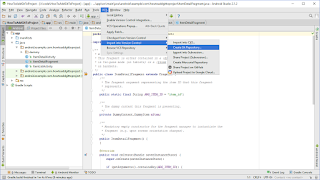
To add version control such as git to your Android Studio Projects and then sharing it to Github follow the below steps: First, create the android project Then go to VCS  --> Import into Version Control  --> Create Git Repository Please find the image below for the reference Then select the root of your project for git init, refer to the image below Then go to Android Studio select root of project , right click and then select Git --> Add, refer to the image below Now again right click project name and select Git-->Commit, refer to the image below once you select commit you will be presented with another screen where you can write commit message and select commit Now our project has been added to the git any changes from now on will be tracked and added to the version control Share Project on GitHub To share the project on GitHub follows the below steps: Go to VCS --> Import into...

Android:How to parse JSON using Okhttp Library Example with Custom View (ImageView + TextView)

Hello to everyone, Today I am posting about JSON Parsing in Android using OkHttp Library. I went through many post for parsing json but there aren't any useful (or) detailed approach (or) step by step approach, so I decided to make a project with git and detailed every step in it.  You can get the whole code on GitHub JSONParsingUsingOkhttp .  Here each and every commit describe the steps I have taken to build the project, just import this project into the Android Studio and navigate through each and every commit to know the steps.  If you find it useful just share this project.

Google Brings Prompt as another option for Two-Step Verification for Android,iOS and Web

Technology giant Google has been advising on two-step verification for additional security of user accounts. For those who still don't use two-step verification, we recommend you enable the security feature following these simple steps. Now, Google is introducing a new Prompt feature to simplify its two-step verification process to make it easier to sign-in for Android and iOS users. While the new prompt feature in two-step verification will be available to Android as well as iOS users, Google points out that iOS users will need the Google Search app installed on their phone to use Google prompt. Android users will get the feature will have to update Google Play Services. Google says that the new feature is being rolled out gradually and may "potentially take longer than 3 days for feature visibility." Here’s how to do it: Go to the Google’s account page. Navigate to Sign-in & Security. Click the Signing in to Google button. And select 2-step verification...

Windows 10 keyboard Shortcuts (or) Windows logo keyboard Shortcuts

Image
If you have installed the Windows 10 OS, want to have a look at the keyboard shortcuts for quick access then this the right place you have been, have a look at it, then try it yourself and enjoy!!!! Windows logo key +  t   =  Shows the Taskbar Taskbar Windows logo key +  a  =  Notifications (or) Action Center Action Center Windows logo key  +  d  =  Desktop Desktop Windows logo key  +  e  =  Quick Access Quick Access Windows logo key  +  h  =  Captures the Current Screen and Give You Option To Share Sharing Screen Windows logo key  +  i  =  Settings Settings Screen Windows logo key  +  j, Windows + f, Windows + n,Windows + w = Searches the desktop Desktop Screen Showing Selected files, folders and Application Shortcuts Windows logo key  +  k = Searches for Wireless Display and Audi...