Posts

How to sign-in and sign-out of Google chrome

Image
So you are actively using Google Chrome as your default browser and visiting sites, bookmarking every link you come across, however now you have decided to carry this bookmarks everywhere with you by syncing (or) signing into Google Chrome and you did it, but what if you don't want others to view your links, here is the video to all your queries

Apache not Starting in Xampp through control panel

Image
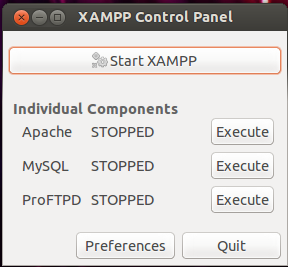
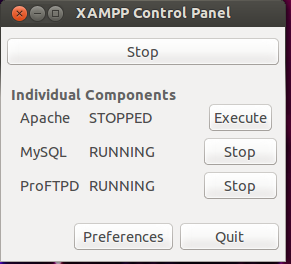
So you have done your work in web server and stopped all the services and switched of your computer, when you reboot it and start your xampp again then you may find that apache is not running and you might get like this as shown in image below To solve this first stop then go to the terminal and type pidof apache2 and you may find four to five different types of numbers for Eg: 1022,1023,1024,1026, these are the process created by apache and has not been killed,so kill it using command sudo kill -9 processno(Eg:sudo kill -9 1022) ,so kill all those process using the command shown for all the numbers. Then again type pidof apache2 to check if there are any process left,if you get again some numbers then kill it using the command shown above follow this until you don't get any numbers.Then press start,now all the services will be running and hence your web-server will be up and running. So before starting the xampp on reboot check for processes of apache a...

Issue's related to Wordpress install in Ubuntu 12.10,13.04,13.10

Image
If you are thinking of developing website using popular blogging and CMS software Wordpress in Ubuntu locally in your machine then you may need to follow below steps to smoothly run your Wordpress. Prerequisites...? Get the Latest Wordpress software. How To Get The Result→ When you install xampp in /opt directory,by default you don't have any permissions of writing (or) deleting any files in that directory,so if you try to paste the wordpress directory in htdocs then it will not allow you to move. To solve this go to terminal and type chown -R www-data:www-data /opt/lampp/htdocs                                                                                                     (owner name):(groupname) Now, you...

How To Add Menu Entry to Xampp in Ubuntu 12.10,13.04,13.10

Image
So you have installed the xampp in Ubuntu 12.10,13.04,13.10, if you haven't installed you want to go through my previous post " How to install xampp ". after installing you may want to add a menu entry (or) desktop shortcuts so that you can easily start and stop instead of doing it through terminal. Prerequisites...? You will need to install python-glade2 for the XAMPP control panel to work: Go to terminal and type  sudo apt-get install python-glade2 How To Get The Result→ Then create a file called XAMPP-Control-Panel.desktop  using text editor in  desktop (or) Home folder and put the following in it: [Desktop Entry] Version=1.0 Encoding=UTF-8 Name=XAMPP Control Panel GenericName=Control Panel Comment=XAMPP Control Panel Exec=gksudo "/opt/lampp/share/xampp-control-panel/xampp-control-panel" Icon=/opt/lampp/htdocs/favicon.ico StartupNotify=true StartupWMClass="xampp-control-panel.py" Terminal=false Type=Application Categories=Dev...

Re-size Images in Ubuntu

The Ubuntu doesn't ships with any default image editor's which provides you an option of re-sizing and rotating the images, so if you think of re-sizing images and don't want to install heavy tools like Gimp, F-spot etc, then you can install Nautilus Image Converter ( sudo apt-get install nautilus-image-converter ) from Ubuntu Software Center which adds two context menus in nautilus so you can right click choose " Re-size image " which presents you with the GUI to perform the necessary action.    Prerequisites...?  First Install Imagemagick through terminal (or) Ubuntu Software Center. In the terminal type ( sudo apt-get install imagemagick ).  How To Get The Result→  First log-out and log-in back to so that changes can be made to your context menu(i.e; right click menu).  Then Right click any image (or) bulk of image to re-size.

Change The Look of Firefox In GNOME 3.6

Ubuntu GNOME ships with Firefox as its default browser but under the default Adwaita theme in GNOME 3.6 Firefox doesn't looks as it should have been. There are 2 Add-ons which will revamp the look of Firefox and remove the title bar when maximized in GNOME 3.6. GNOME 3 for Firefox styles Firefox with Adwaita tab styles, widgets, buttons and hinting.The theme will work fine with Firefox 22 and up.Add the  GNOME 3  to your Firefox and make it look better. HTitle for FireFox forces it to lose it's title bar and gives more space to display your webpages. Add the HTitle to your Firefox for GNOME 3.6.

How to install xampp 1.8.1 in Ubuntu 12.10,13.04,13.10

So you have Installed the Ubuntu 12.10 and now wants to add the xampp (or) lampp into it...then follow this steps Download the latest version of xampp for either 32 (or) 64 bit from the link  Download xampp Go to the terminal and log in as administrator using the commands sudo su Then before extracting the tar file navigate to directory where it has been downloaded           For eg: I downloaded it from Chrome and it saved me in a Downloads folder, so I navigated to the downloads folder first then extracting the tar file So now use this command to extract the tar file  tar xvfz xampp-linux-1.8.1.tar.gz -C /opt For 64bit version: Start If you downloaded the 64 bit then you need to install the 32bit libraries from repository to start the xampp, otherwise you will get this error message " XAMPP is currently only availably as 32 bit application. Please use a 32 bit compatibility library for your system." ...

Sound Problem in Ubuntu 12.10 & 13.04

As I installed the Ubuntu 12.10, every thing looks fine but when I played the video in YouTube there was a problem with sound,the sound was randomly cutting out and it irritated me to watch the video,so I thought to find the solution for this and I found out after some hiccups.... Just open the terminal  and type alsamixer   Navigate to Auto-Mute Mode  and change its status to Disable  if it is Enabled .... Hurray now YouTube video works with audio with no no sound cutting problems.

How to get back to old YouTube Layout

Image
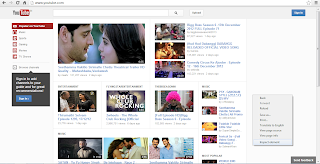
  Are you worried and depressed in new YouTube layout and facing difficulties in navigation and can't able to find the videos, then don't worry I will show you how to do it to get that old layout. Go to youtube.com in the Google Chrome browser and you can see the new look has been rolled out for everyone, so for that follow these steps below Right Click on youtube page and Click on "Inspect element" Fig.1    2.   A Developer Window will open and then bottom of the page click on "Show console" button. Fig.2   3.  Then clear clear the console and paste the following code          document.cookie="VISITOR_INFO1_LIVE=qDpUsBNO0FY; expires=Thu, 2 Aug 2020 20:47:11 UTC";        as it in the console and hit enter 4.   Refresh the youtube page and soon you will get the old layout back. Note:  This code works until google chrome is alive once you closed and re-open it...

What to do For Android Setup

Hmmm......Thinking of Building a new App for your android phone then go for it my World.... Just Follow these steps below : Download the Complete package of ADT  (Android Developer Tools) bundle instead of downloading SDK tools then other packages then ADT plugin. The ADT contains the following     Eclipse + ADT plugin     Android SDK Tools     Android Platform-tools     The latest Android platform     The latest Android system image for the emulator After Downloading it Just Unzip it and Launch Eclipse. Everything will be configured to build the App for you. Now you are ready to get drowned in sea of Android.

Fevicol Se Funny Video

Image
Fevicol Se Funny Lyrics

Gmail 10GB attachments through Drive

Do you feel the 25MB limit for attachments in Gmail is not enough? Well Google seems to have heard your prayers. The search giant has integrated Google Drive-based attachments in its email service so that users can now send files up to 10GB in size. Google Drive the company’s cloud storage service, similar to Microsoft SkyDrive and DropBox. On the official Gmail blog, Phil Sharp, Gmail product manager, posted: “you can insert files from Drive directly into an email without leaving your Gmail.” He added, “… with Drive, you can insert files up to 10GB — 400 times larger than what you can send as a traditional attachment. Also, because you’re sending a file stored in the cloud, all your recipients will have access to the same, most-up-to-date version.” In case all the recipients of the mail do not have access to the file in Google Drive, Gmail will prompt the user so the requisite settings can be altered from the open message box itself. Moreover, use...

Race Trailers

Image
Race 2 Trailer Race Trailer Race Trailer

FilmY Trailers Jan-2013

Image
Race 2 Matru Ki Bijlee Ka Mandola Table No 21

FilmY Trailers Dec-2012

Image
Dabaang 2 Trailer Khiladi 786 Trailer

FilmY Trailers Nov-2012

Image
Talaash Trailer Jab Tak Hai Jaan Trailer Son Of Sardar Trailer Main Krishna Hoon Trailer 1920-Evil Returns Trailer Luv Shuv Tey Chicken Khurana Trailer

FilmY Trailers Oct-2012

Image
Rush Trailer Ajab Gazabb Love Trailer Chakravyuh Trailer Student Of The Year Trailer Bhoot Returns Trailer Chittagong Trailer Aiyya Trailer Kismat Love Paisa Dilli Trailer English Vinglish Trailer

FilmY Trailers Sep-2012

Image
Oh My God Trailer Kamaal Dhamaal Malamaal Trailer Heroine Trailer Barfi Trailer Raaz 3 Trailer

FilmY Trailers Aug-2012

Image
I M 24 Trailer Joker Trailer Shirin Farhad Ki Toh Nikal Padi Trailer Ek Tha Tiger Trailer Gangs Of Wasseypur 2 Trailer Jism2 Trailer

FilmY Trailers Jul-2012

Image
Kyaa Super Kool Hain Hum Trailer Cocktail Trailer Bol Bachchan Trailer